
What a new hire's role card should require, allow, and refuse, and how to prove each required item works on day one.
Design a role bundle around one test: by day one, can the new hire do the job's first real task? For a support analyst, that task is claiming a ticket from the queue and working it.
Every item on the role's card either serves that task, waits for someone's approval, or stays off the account. Role-based access bundles fail when nobody writes those three lists down. They also fail when "requested" gets mistaken for "usable."
Rowan Adeyemi, a support analyst joining Halden Freight, shows both failures. Rowan, Halden, and every record below are invented for this article. The day before Rowan started, a coordinator granted everything tagged Support Ops, because an onboarding chatbot had called Rowan "eligible for Support Ops tools."
That grant included the helpdesk admin console, which controls regional queue routing. It missed the one item Rowan's first ticket needed: a licensed agent seat.
The card: what the role gets, waits for, and never gets
A birthright access bundle is the starting set of accounts and permissions a new hire receives because of an approved role. It's set at least privilege, meaning the minimum access the assigned work needs, nothing broader.
Halden's card for Rowan's role is below. The fields are the ones you'd set for any role; the entries are fictional.
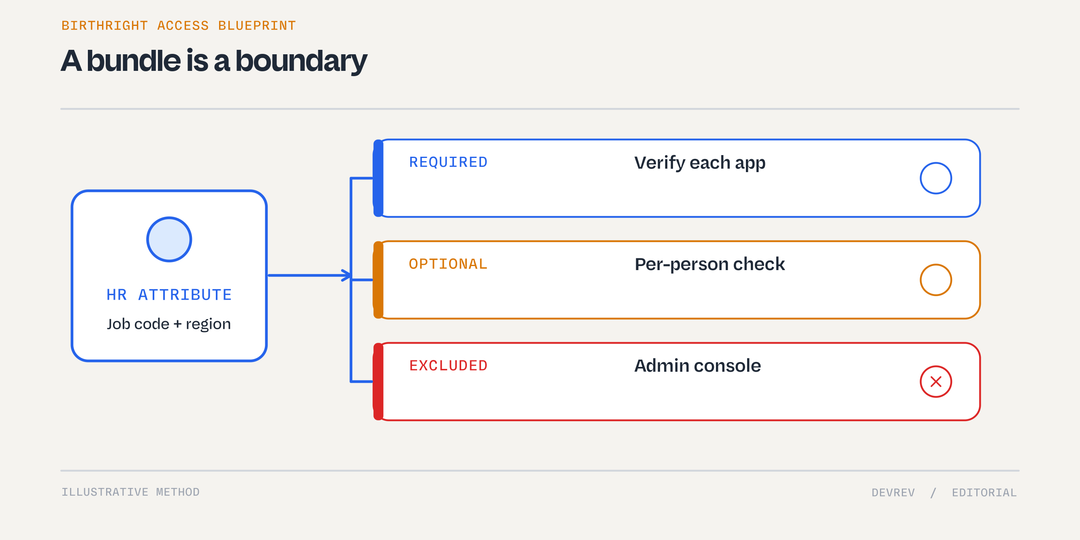
Illustrative role card – Derive the bundle from an approved job code and region, verify required access in each app, and keep the admin console excluded.
The card is only as good as its input. The bundle derives from an authoritative attribute, never from what the employee types or what an assistant infers. "Support Ops lead" typed into an onboarding form is a claim, not a trusted record. So was the chatbot's eligibility answer.
This article proposes one policy choice: preapprove the mapping, not each grant. A named policy owner signs off on the role-to-bundle mapping and its version. Each hire is still checked: a trusted joiner event from the human resources (HR) system, matching conditions, and any per-hire approval your policy keeps.
The HRIS holds an approved hire event for employee HF-20417, job code SUP-OPS-2, region EMEA. The HR operations owner approved it three business days before the start date. Version 3 maps that job code to four required items, and one request covering all four was raised three days before the start.
Anything off the card is an exception with its own named approver. An approved bundle isn't unlimited privilege. The same limit applies to tools: a service account, the integration login a tool uses to act, should only request items on the card. An approved mapping doesn't give it authority to grant extras.
Role changes and one-off software purchases follow their own processes. This card covers the joiner moment inside the wider employee request journey described in AI for IT support.
Required means usable, not just assigned
Each required item has to climb the same ladder, for the same person. Most onboarding checklists stop two or three rungs early.
Every rung is a separate fact, so each needs its own evidence for HF-20417, read from the target system.
Here's Halden's authored check at 9:10 AM on Rowan's first day. It's a proposed method, not an industry standard, and nothing was run against a live system.
Three of four required items are assignment-confirmed. None is use-confirmed, and one excluded item is live on the account. A ticket marked "onboarding complete" here would be wrong twice.
That's the gap Employee self-service beyond the ticket describes: a closed ticket isn't finished work if the employee still can't do their job. Anything short of use stays visible, with a named owner and a time limit. Halden's four business hours is illustrative, not a recommended standard.
What each required item has to show
The ladder is the same for all four items. The evidence at the top of it isn't, so write the use check for each item before the start date.
Directory account and SSO
An assignment proves the account object exists and the SSO app is assigned. It doesn't prove Rowan can authenticate. The proof is Rowan signing in through SSO, which happens at 9:50 AM.
Helpdesk agent seat
This is the item the first ticket depends on, and the one that failed. The directory placed Rowan in the right group, but the helpdesk recorded only a viewer license.
Before acting, Mara confirms they own seat assignment for this app and that an unassigned agent seat exists. At 9:40 AM, Mara assigns it, and the license report shows an agent seat for HF-20417. Its use check comes last, because it's the one the whole card exists for.
Had no seat been free, the item would stay open under Mara, with no automatic purchase. If Mara were away, backup app owner Dev Patel would hold it, with the missing license record named.
Knowledge base reader
The app role record already shows the reader role. Use means Rowan opens one assigned article, which they do right after the 9:50 AM sign-in.
Team chat channel
A name on the membership list is assignment. A post is use, and by 10:10 AM Rowan has posted in the team channel.
Excluded means refused, even after someone granted it
The admin console was never on the card, yet it was on Rowan's account. That makes it an over-grant, and Rowan's request to keep it is an exception for Tomas.
Keep the base request moving and send the console to Tomas. The prohibited step is keeping it because the role attribute says Support Ops. Who may grant or use access is its own authorization question, covered in AI access control.
At 9:20 AM, Tomas refuses the request because queue routing isn't part of the analyst role, and records the reason. At 9:30 AM, Tomas removes the admin role in the helpdesk, and the role record no longer lists it.
A clean role record isn't the whole proof. The session log shows no active Rowan sessions to end, though session handling varies by app. Tomas also reviews the admin audit log, which shows no routing changes under HF-20417.
The last proof is a denial. When Rowan opens the admin console after signing in, it returns access denied. If a real admin duty emerges later, Rowan's manager files a privileged access request with security review.
When the bundle counts as done
With all four use checks recorded by 10:10 AM, Rowan accepts all four required items in the request record at 10:15 AM. Only then is the required bundle complete. The refused exception and the removed over-grant stay as separate records. Nobody should later read "complete" as "everything Rowan asked for."
To track role-based access bundles across joiners, compare use-confirmed required items with requested ones. Count out-of-role grants per joiner, too.
The card also gives you a fair test for any tool that touches joiner requests, including Computer, by DevRev. Ask whether your configuration can read an authorized attribute and request only what's on the card through an approved path. Then ask whether it routes exceptions to a named approver and shows confirmation from each target app.
Treat every answer as unconfirmed until it appears in your own setup. If you'd like to try that with one of your roles, scope a new-hire role card with DevRev. Judge the session by whether it shows a usable item, not an approved request.
For Rowan, the test was met just before that acceptance. By 10:10 AM, Rowan had claimed a sandbox ticket and logged an internal note, on the seat Mara assigned at 9:40 AM.
The admin console still answered access denied. Both results are the bundle doing its job.